> ## Documentation Index
> Fetch the complete documentation index at: https://docs.chattermate.chat/llms.txt
> Use this file to discover all available pages before exploring further.
# Configure AI Provider
> Configure your AI provider in ChatterMate — OpenAI, Anthropic (Claude), Google Gemini, Mistral, xAI Grok, DeepSeek, or Groq — with your own API key to power 24/7 support.
# AI Provider Configuration
Configure your preferred AI provider to power ChatterMate's intelligent customer support capabilities.
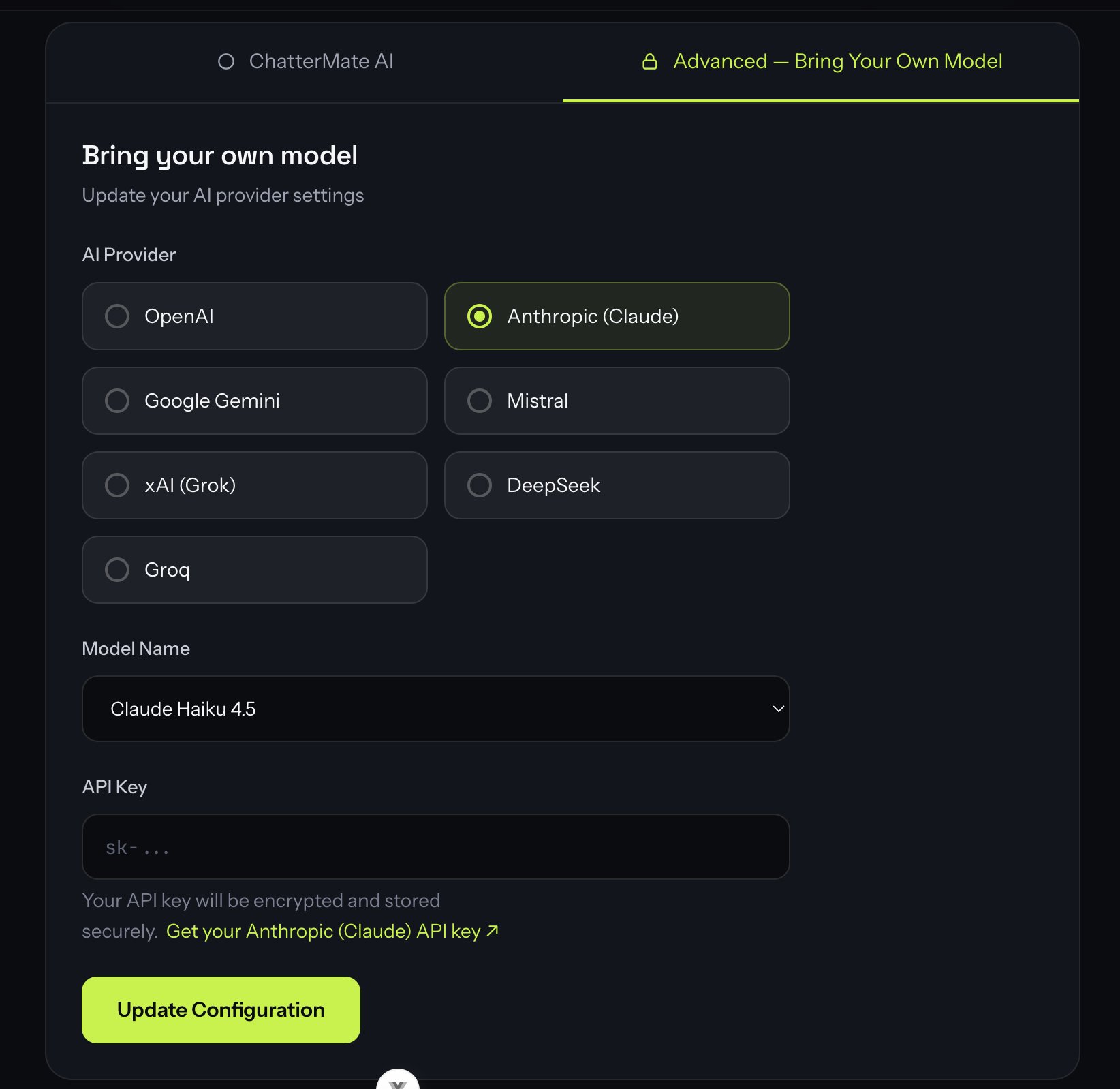 ## Available Providers
ChatterMate supports multiple AI providers, giving you the flexibility to choose the one that best fits your needs:
GPT-4.1, GPT-4o, and o-series models
Claude Opus, Sonnet, and Haiku
Gemini 2.5 Pro / Flash
Mistral Large, Medium, and Small
Grok 4 and Grok 3
DeepSeek Chat and Reasoner
Ultra-fast inference (GPT-OSS, Llama)
Every provider is **bring-your-own-key** — you supply your own API key, encrypted at rest. When you pick a provider, a **"Get your API key"** link points to that provider's console.
## Configuration Fields
### AI Provider
Select your provider from the grid. All listed providers support tool calling and structured output, so any of them works with ChatterMate's agents, knowledge search, and workflows:
* **OpenAI** (Recommended): Best-in-class models with consistent performance
* **Anthropic (Claude)**: Strong reasoning and analysis
* **Google Gemini**: Large context windows, great price/performance
* **Mistral / xAI (Grok) / DeepSeek / Groq**: Cost, speed, and self-hosting-friendly options
Features that depend on structured output — automatic **lead capture**, **ending
a resolved chat**, and **human handoff** — are most consistent on OpenAI and
Anthropic models. Smaller open models (e.g. Groq's GPT-OSS, some Grok variants)
handle these well most of the time but can occasionally miss a step. If you find
a model isn't capturing leads or closing chats reliably, switch to a stronger
model like GPT-4.1 or Claude.
### Model Name
Pick a suggested model from the dropdown, or choose **"Custom model ID"** to type any model your provider supports (handy when a provider ships a new model before this list updates). Suggested models:
```bash OpenAI (Recommended) theme={null}
gpt-4.1 # Strong general default
gpt-4o # Fast, capable
gpt-4o-mini # Cost-effective
o4-mini # Reasoning model
```
```bash Anthropic (Claude) theme={null}
claude-opus-4-8 # Most capable
claude-sonnet-5 # Balanced performance
claude-haiku-4-5 # Fast and efficient
```
```bash Google Gemini theme={null}
gemini-2.5-pro # Highest quality
gemini-2.5-flash # Best price/performance
```
```bash Mistral theme={null}
mistral-large-latest # Flagship
mistral-small-latest # Cost-effective
```
```bash xAI (Grok) theme={null}
grok-4 # Flagship reasoning model
grok-3 # Previous generation
```
```bash DeepSeek theme={null}
deepseek-chat # General model
deepseek-reasoner # Reasoning model
```
```bash Groq theme={null}
openai/gpt-oss-120b # Top quality on Groq
llama-3.3-70b-versatile # Fast, reliable
```
Model IDs change over time as providers release and retire models. If a suggested ID stops working, use **Custom model ID** and paste the current identifier from your provider's docs.
### API Key
Your provider's API key for authentication. Security measures:
* Keys are encrypted before storage
* Keys are never logged or exposed in plaintext
* Access is restricted to authorized systems only
* Regular key rotation is supported
* Compliance with SOC 2 standards
Never share your API keys or commit them to version control. ChatterMate encrypts and stores them securely.
## Best Practices
1. **Provider Selection**
* Start with OpenAI's GPT-4.1 / GPT-4o for best overall performance
* Consider Anthropic's Claude for complex reasoning tasks
* Use Groq (GPT-OSS / Llama) when you want the fastest, lowest-cost inference
2. **Model Choice**
* Balance between capability and cost
* Test different models before production
* Monitor usage and adjust as needed
3. **Security**
* Use environment-specific API keys
* Rotate keys periodically
* Monitor usage for anomalies
## What's Next?
After configuring your AI provider:
1. Test the configuration with sample queries
2. Customize the AI agent's behavior
3. Add domain knowledge to improve responses
4. Set up human handoff rules
Next: Learn how to customize your AI agent's behavior
## Available Providers
ChatterMate supports multiple AI providers, giving you the flexibility to choose the one that best fits your needs:
GPT-4.1, GPT-4o, and o-series models
Claude Opus, Sonnet, and Haiku
Gemini 2.5 Pro / Flash
Mistral Large, Medium, and Small
Grok 4 and Grok 3
DeepSeek Chat and Reasoner
Ultra-fast inference (GPT-OSS, Llama)
Every provider is **bring-your-own-key** — you supply your own API key, encrypted at rest. When you pick a provider, a **"Get your API key"** link points to that provider's console.
## Configuration Fields
### AI Provider
Select your provider from the grid. All listed providers support tool calling and structured output, so any of them works with ChatterMate's agents, knowledge search, and workflows:
* **OpenAI** (Recommended): Best-in-class models with consistent performance
* **Anthropic (Claude)**: Strong reasoning and analysis
* **Google Gemini**: Large context windows, great price/performance
* **Mistral / xAI (Grok) / DeepSeek / Groq**: Cost, speed, and self-hosting-friendly options
Features that depend on structured output — automatic **lead capture**, **ending
a resolved chat**, and **human handoff** — are most consistent on OpenAI and
Anthropic models. Smaller open models (e.g. Groq's GPT-OSS, some Grok variants)
handle these well most of the time but can occasionally miss a step. If you find
a model isn't capturing leads or closing chats reliably, switch to a stronger
model like GPT-4.1 or Claude.
### Model Name
Pick a suggested model from the dropdown, or choose **"Custom model ID"** to type any model your provider supports (handy when a provider ships a new model before this list updates). Suggested models:
```bash OpenAI (Recommended) theme={null}
gpt-4.1 # Strong general default
gpt-4o # Fast, capable
gpt-4o-mini # Cost-effective
o4-mini # Reasoning model
```
```bash Anthropic (Claude) theme={null}
claude-opus-4-8 # Most capable
claude-sonnet-5 # Balanced performance
claude-haiku-4-5 # Fast and efficient
```
```bash Google Gemini theme={null}
gemini-2.5-pro # Highest quality
gemini-2.5-flash # Best price/performance
```
```bash Mistral theme={null}
mistral-large-latest # Flagship
mistral-small-latest # Cost-effective
```
```bash xAI (Grok) theme={null}
grok-4 # Flagship reasoning model
grok-3 # Previous generation
```
```bash DeepSeek theme={null}
deepseek-chat # General model
deepseek-reasoner # Reasoning model
```
```bash Groq theme={null}
openai/gpt-oss-120b # Top quality on Groq
llama-3.3-70b-versatile # Fast, reliable
```
Model IDs change over time as providers release and retire models. If a suggested ID stops working, use **Custom model ID** and paste the current identifier from your provider's docs.
### API Key
Your provider's API key for authentication. Security measures:
* Keys are encrypted before storage
* Keys are never logged or exposed in plaintext
* Access is restricted to authorized systems only
* Regular key rotation is supported
* Compliance with SOC 2 standards
Never share your API keys or commit them to version control. ChatterMate encrypts and stores them securely.
## Best Practices
1. **Provider Selection**
* Start with OpenAI's GPT-4.1 / GPT-4o for best overall performance
* Consider Anthropic's Claude for complex reasoning tasks
* Use Groq (GPT-OSS / Llama) when you want the fastest, lowest-cost inference
2. **Model Choice**
* Balance between capability and cost
* Test different models before production
* Monitor usage and adjust as needed
3. **Security**
* Use environment-specific API keys
* Rotate keys periodically
* Monitor usage for anomalies
## What's Next?
After configuring your AI provider:
1. Test the configuration with sample queries
2. Customize the AI agent's behavior
3. Add domain knowledge to improve responses
4. Set up human handoff rules
Next: Learn how to customize your AI agent's behavior