> ## Documentation Index
> Fetch the complete documentation index at: https://docs.chattermate.chat/llms.txt
> Use this file to discover all available pages before exploring further.
# AI Ticketing
> AI-first support tickets that auto-triage, investigate your logs and databases, and document a root cause with cited evidence — under staged autonomy you control.
# AI Ticketing
Turn support issues into tickets that investigate themselves. ChatterMate raises a ticket from a
chat (by the AI or an agent) or an incoming alert, **auto-triages** it, then runs an AI
**investigation** that forms hypotheses, tests each one against your connected logs and databases,
and writes a **root-cause analysis with cited evidence** — all in the open, with staged autonomy
you decide.
 AI Ticketing is a **Pro / Enterprise** feature. On the community (self-hosted) edition it is fully open.
## Where to find it
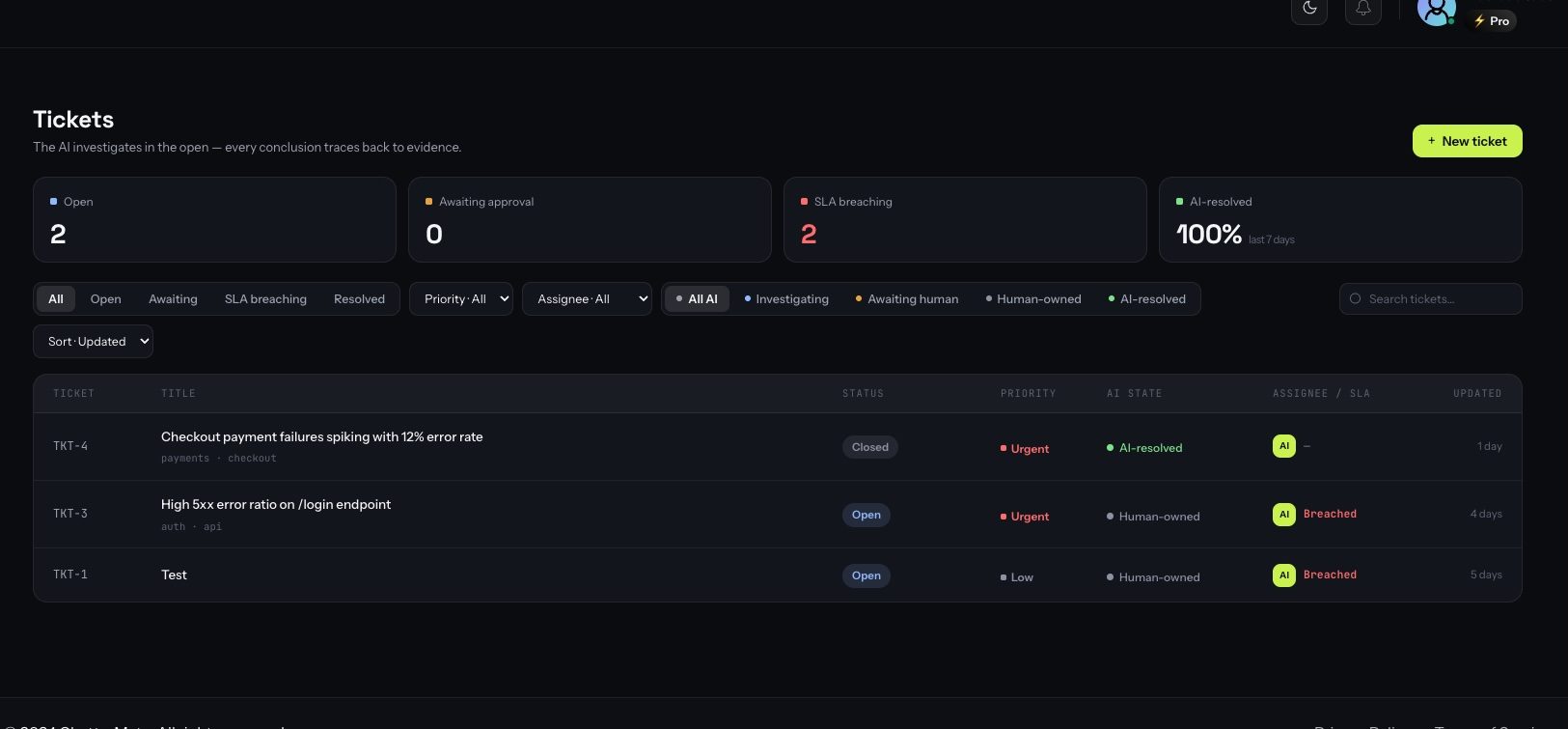
* **Tickets** in the main menu — the workspace: list, filters, and every ticket's detail.
* **Ticketing** under Settings — autonomy level, SLA targets, customer-message templates, and the investigation connectors.
## How tickets are created
When the AI can't resolve a technical issue from the knowledge base, it opens a ticket for the
conversation and links it — the customer keeps chatting normally.
An agent raises one from the Tickets workspace or straight from a conversation, with an
AI-drafted title and description.
A webhook from Grafana, Alertmanager or a generic source auto-creates a ticket and kicks off an
investigation — before a customer even reports it.
Every new ticket is **triaged** by the AI: it sets priority, severity and intent, rewrites the
title into one clear line, and **deduplicates** against open tickets so the same incident doesn't
spawn ten tickets.
## The investigation — a glass box
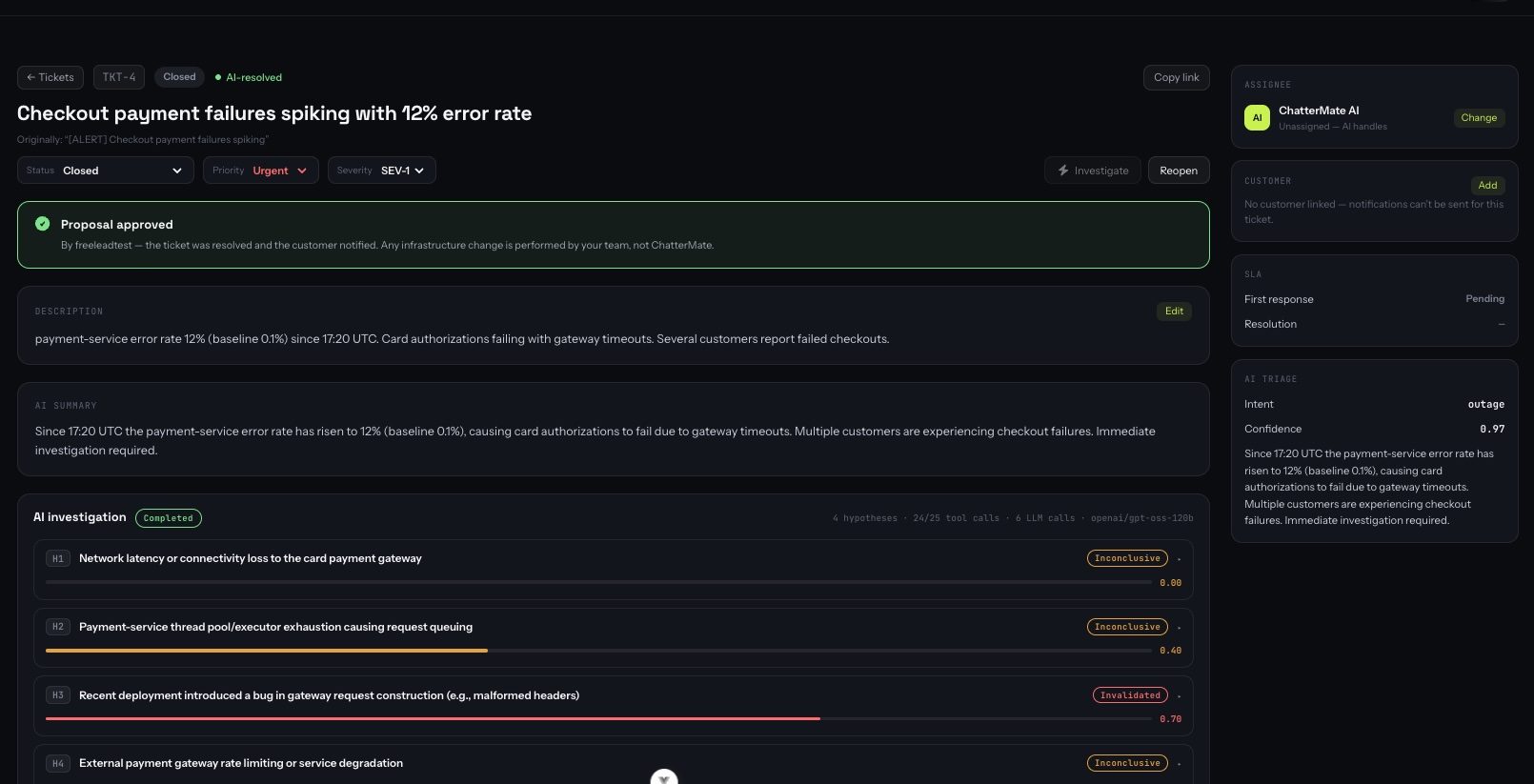
When investigation sources are connected, the AI works the ticket like an on-call engineer, and you
watch it happen. It proposes **hypotheses**, tests each against your tools, marks every one
**validated / invalidated / inconclusive** with a confidence score, and cites the exact query and
result behind each conclusion.
AI Ticketing is a **Pro / Enterprise** feature. On the community (self-hosted) edition it is fully open.
## Where to find it
* **Tickets** in the main menu — the workspace: list, filters, and every ticket's detail.
* **Ticketing** under Settings — autonomy level, SLA targets, customer-message templates, and the investigation connectors.
## How tickets are created
When the AI can't resolve a technical issue from the knowledge base, it opens a ticket for the
conversation and links it — the customer keeps chatting normally.
An agent raises one from the Tickets workspace or straight from a conversation, with an
AI-drafted title and description.
A webhook from Grafana, Alertmanager or a generic source auto-creates a ticket and kicks off an
investigation — before a customer even reports it.
Every new ticket is **triaged** by the AI: it sets priority, severity and intent, rewrites the
title into one clear line, and **deduplicates** against open tickets so the same incident doesn't
spawn ten tickets.
## The investigation — a glass box
When investigation sources are connected, the AI works the ticket like an on-call engineer, and you
watch it happen. It proposes **hypotheses**, tests each against your tools, marks every one
**validated / invalidated / inconclusive** with a confidence score, and cites the exact query and
result behind each conclusion.
 The result is a versioned **root-cause analysis** — summary, impact, timeline, contributing
factors, conclusion, remediation, prevention, and a plain-language **customer summary** — with
inline links back to the evidence that proves it. Nothing is a black box: every tool call is
recorded, so you can audit exactly what the AI looked at.
## Staged autonomy — you set the ceiling
The AI never exceeds the level you choose, and every level still logs its actions for audit.
The result is a versioned **root-cause analysis** — summary, impact, timeline, contributing
factors, conclusion, remediation, prevention, and a plain-language **customer summary** — with
inline links back to the evidence that proves it. Nothing is a black box: every tool call is
recorded, so you can audit exactly what the AI looked at.
## Staged autonomy — you set the ceiling
The AI never exceeds the level you choose, and every level still logs its actions for audit.
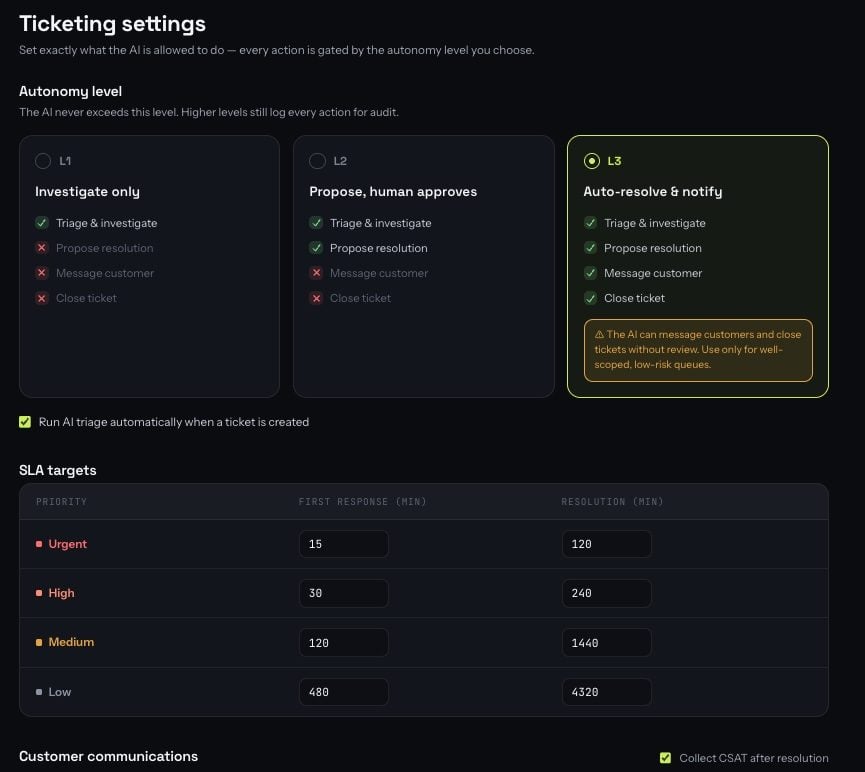 The AI triages, investigates and documents. Every customer message and status change is a human action.
The AI also **proposes** a resolution. A pinned banner shows the proposal and the verification
query behind it; you **Approve** or **Reject with a reason** (the reason feeds a refined
investigation). Approving records who and when — ChatterMate never executes an infrastructure change.
The AI may also message the customer and close the ticket, behind hard confidence guards. Best
for well-scoped, low-risk queues.
## Customer communications
Ticket-created and ticket-resolved messages use editable templates with `[customer]` and `[ticket]`
placeholders and a live preview, so customers hear from you in your own voice. You can collect CSAT
after resolution, and auto-close a resolved ticket after a set number of hours without a reply.
Customer emails are sent from your **connected email inbox** — connect one under Integrations to
send from your own domain; otherwise ChatterMate's address is used.
## Connecting investigation sources
Under **Settings → Ticketing**, attach read-only sources for the investigation agent (they never
touch the customer-facing chat agent):
The AI triages, investigates and documents. Every customer message and status change is a human action.
The AI also **proposes** a resolution. A pinned banner shows the proposal and the verification
query behind it; you **Approve** or **Reject with a reason** (the reason feeds a refined
investigation). Approving records who and when — ChatterMate never executes an infrastructure change.
The AI may also message the customer and close the ticket, behind hard confidence guards. Best
for well-scoped, low-risk queues.
## Customer communications
Ticket-created and ticket-resolved messages use editable templates with `[customer]` and `[ticket]`
placeholders and a live preview, so customers hear from you in your own voice. You can collect CSAT
after resolution, and auto-close a resolved ticket after a set number of hours without a reply.
Customer emails are sent from your **connected email inbox** — connect one under Integrations to
send from your own domain; otherwise ChatterMate's address is used.
## Connecting investigation sources
Under **Settings → Ticketing**, attach read-only sources for the investigation agent (they never
touch the customer-facing chat agent):
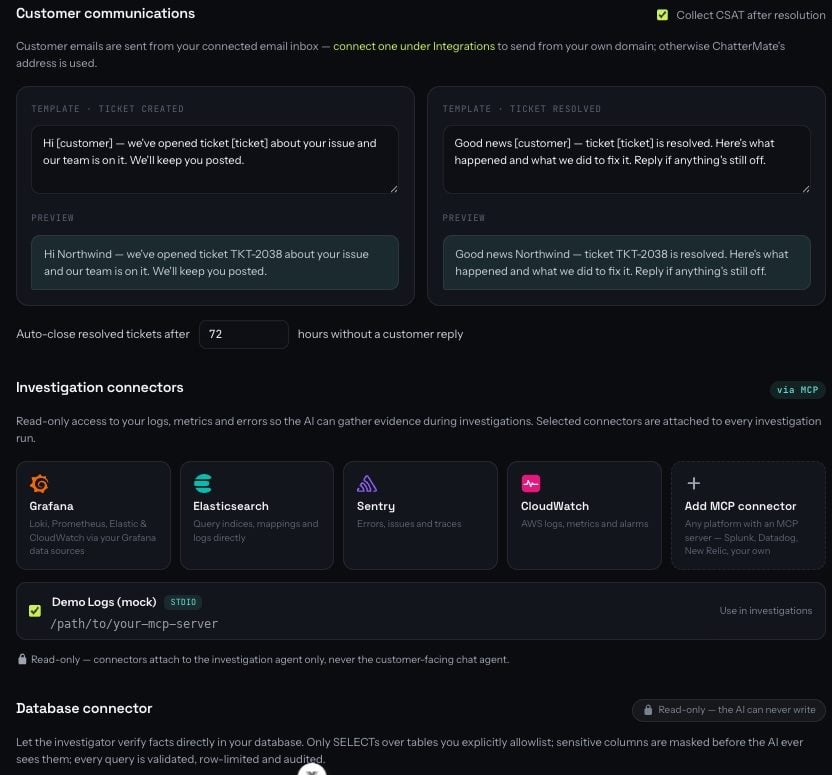 One-click presets for **Grafana, Elasticsearch, Sentry and CloudWatch**, or any MCP server
(Datadog, Splunk, New Relic, custom) as a generic entry — with encrypted per-org credentials.
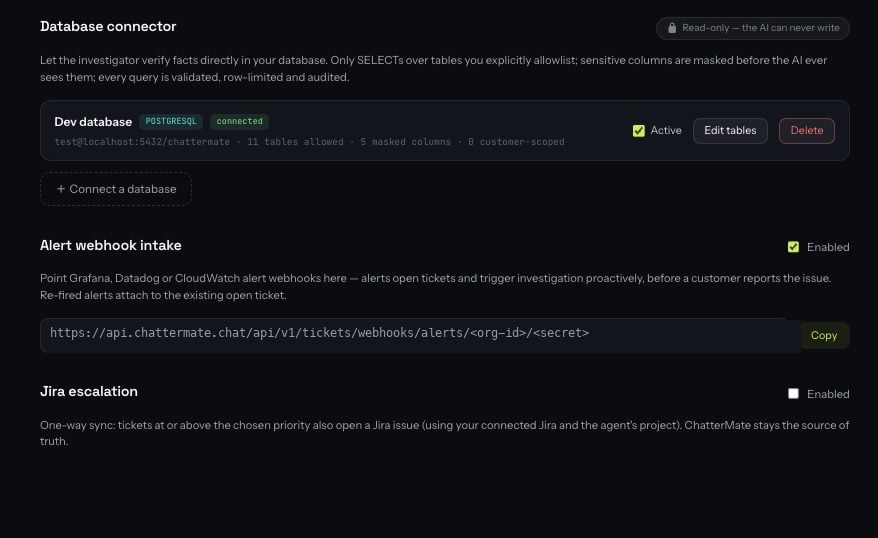
Connect a **Postgres or MySQL** database — directly, or over an **SSH tunnel** for production
databases behind a bastion. Pick exactly which tables the AI may read, mask sensitive columns,
and optionally restrict a table to the ticket customer's own rows.
Each saved connector shows exactly what it exposes — how many tables are allowlisted, how many
columns are masked, and how many are scoped to the ticket's own customer.
One-click presets for **Grafana, Elasticsearch, Sentry and CloudWatch**, or any MCP server
(Datadog, Splunk, New Relic, custom) as a generic entry — with encrypted per-org credentials.
Connect a **Postgres or MySQL** database — directly, or over an **SSH tunnel** for production
databases behind a bastion. Pick exactly which tables the AI may read, mask sensitive columns,
and optionally restrict a table to the ticket customer's own rows.
Each saved connector shows exactly what it exposes — how many tables are allowlisted, how many
columns are masked, and how many are scoped to the ticket's own customer.
 ### Database guardrails
The investigation agent reads untrusted customer text while holding live tool access, so the limits
are enforced in code, not by prompting:
* **Read-only, structurally.** Queries are parsed to an AST and rejected unless they're a single
plain `SELECT` against an allowlisted table, with a forced `LIMIT`. The connection itself is a
read-only transaction with a statement timeout — a second, independent barrier.
* **Masked columns are never readable** — blocked even in a `WHERE` clause, so values can't be
probed, and whole-row tricks are blocked too.
* **Row-level scoping** rewrites a query to return only the ticket customer's own rows — the AI
can't widen it.
* **Nothing is ever written** to your database; approving a proposal only records the decision.
* **Every query is audited** with its SQL and outcome; returned rows are never stored.
Point the connector at a **least-privilege, read-only database user** restricted to the tables
support genuinely needs — never a superuser. Prefer views that are already scoped.
## Usage & billing
Investigations run on the platform-hosted model and count against your plan's **message quota** —
one message per model call, the same meter chat and FAQ generation use. Cheap triage always runs so
tickets stay classified; a full investigation is paused (with a note on the ticket) once an org is
out of credits, and resumes next billing period or after an upgrade. Own-key organizations pay their
provider directly and are never metered.
## Works alongside Jira
Native tickets don't replace an existing Jira setup. An explicit per-agent Jira configuration takes
precedence, and native tickets can **escalate to Jira one-way** when you want an incident tracked
there as well. See [Jira Integration](/features/jira-integration).
## Per-agent control
Ticketing can be toggled per agent under the agent's **Integrations** tab, so only the agents you
choose open tickets.
### Database guardrails
The investigation agent reads untrusted customer text while holding live tool access, so the limits
are enforced in code, not by prompting:
* **Read-only, structurally.** Queries are parsed to an AST and rejected unless they're a single
plain `SELECT` against an allowlisted table, with a forced `LIMIT`. The connection itself is a
read-only transaction with a statement timeout — a second, independent barrier.
* **Masked columns are never readable** — blocked even in a `WHERE` clause, so values can't be
probed, and whole-row tricks are blocked too.
* **Row-level scoping** rewrites a query to return only the ticket customer's own rows — the AI
can't widen it.
* **Nothing is ever written** to your database; approving a proposal only records the decision.
* **Every query is audited** with its SQL and outcome; returned rows are never stored.
Point the connector at a **least-privilege, read-only database user** restricted to the tables
support genuinely needs — never a superuser. Prefer views that are already scoped.
## Usage & billing
Investigations run on the platform-hosted model and count against your plan's **message quota** —
one message per model call, the same meter chat and FAQ generation use. Cheap triage always runs so
tickets stay classified; a full investigation is paused (with a note on the ticket) once an org is
out of credits, and resumes next billing period or after an upgrade. Own-key organizations pay their
provider directly and are never metered.
## Works alongside Jira
Native tickets don't replace an existing Jira setup. An explicit per-agent Jira configuration takes
precedence, and native tickets can **escalate to Jira one-way** when you want an incident tracked
there as well. See [Jira Integration](/features/jira-integration).
## Per-agent control
Ticketing can be toggled per agent under the agent's **Integrations** tab, so only the agents you
choose open tickets.