> ## Documentation Index
> Fetch the complete documentation index at: https://docs.chattermate.chat/llms.txt
> Use this file to discover all available pages before exploring further.
# Chat Management
> Manage customer conversations in ChatterMate with advanced filtering, human takeover from AI, chat reassignment, and full lifecycle control in one inbox.
# Chat Management
Monitor and manage customer conversations with advanced filtering, seamless human-AI collaboration, and comprehensive chat lifecycle management.
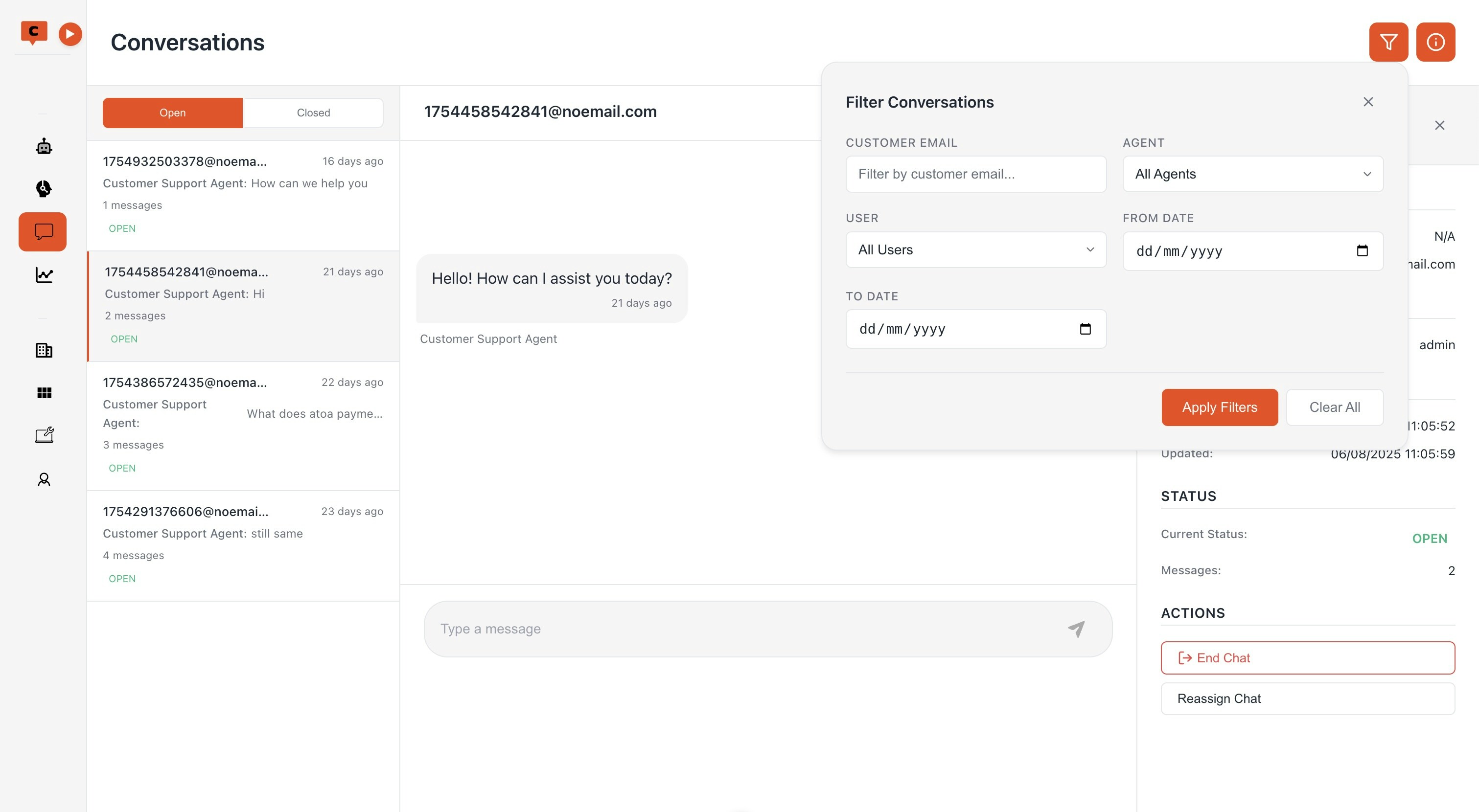 ## Advanced Conversation Filtering
### Filter Options
* **Agent Filter**: Filter conversations by specific AI agents
* **User Filter**: Filter conversations by human agents/users
* **Customer Email**: Search conversations by customer email
* **Date Range**: Filter conversations within specific time periods
* **Smart UI**: Icon-based filter toggle with active filter count indicator
### Filter Features
* Apply-on-demand filtering (click "Apply Filters" to activate)
* Auto-close filter panel after applying
* Clear all filters with one click
* Real-time filter count display
## Chat Information Panel
### Detailed Chat View
* **Customer Information**: View customer details and contact information
* **Assignment Tracking**: See current assignee and assignment timestamp
* **Timeline**: Track chat creation and last update times
* **Status Monitoring**: Real-time chat status (Open, Transferred, Closed)
* **Toggleable Sidebar**: Discord/Slack-style panel that pushes content
### Panel Features
* Responsive design matching conversation list height
* Easy toggle on/off functionality
* Comprehensive chat metadata display
## Chat Actions & Control
Human agents can instantly take control of AI-handled conversations
Transfer chats between human agents with notifications
Close conversations with reason tracking and descriptions
### Human Takeover
* **Smart Permissions**: Only available for open chats handled by AI
* **Instant Transfer**: Seamless transition from AI to human agent
* **Real-time Updates**: UI refreshes automatically after takeover
* **Status Sync**: Chat assignment updated across all interfaces
### Chat Reassignment
* **User Selection**: Easy dropdown with agent names and emails
* **Validation**: Only open, user-handled chats can be reassigned
* **Multi-party Notifications**: Automatic notifications sent to:
* Customer (chat reassigned)
* New assignee (new chat assigned)
* Previous assignee (chat transferred)
* **Real-time Sync**: Instant updates across all connected clients
### Automated Chat Management
* **Auto-close**: AI-handled chats automatically close after 24 hours of inactivity
* **Reason Tracking**: End chat reasons and descriptions for analytics
* **Background Processing**: Daily worker checks for inactive chats
## Real-time Features
### Live Updates
* Socket.IO integration for instant notifications
* Real-time chat status changes
* Multi-client synchronization
* Toast notifications for user actions
### Notification System
* Chat takeover notifications
* Reassignment alerts
* Status change updates
* New message indicators
## What's Next?
After setting up advanced chat management:
1. **Configure Filters**: Set up default filters for your team
2. **Train Agents**: Educate team on takeover and reassignment features
3. **Monitor Analytics**: Track chat lifecycle and agent performance
4. **Optimize Workflows**: Use reassignment for workload balancing
5. **Review Auto-close**: Adjust inactive chat timeout if needed
## Advanced Conversation Filtering
### Filter Options
* **Agent Filter**: Filter conversations by specific AI agents
* **User Filter**: Filter conversations by human agents/users
* **Customer Email**: Search conversations by customer email
* **Date Range**: Filter conversations within specific time periods
* **Smart UI**: Icon-based filter toggle with active filter count indicator
### Filter Features
* Apply-on-demand filtering (click "Apply Filters" to activate)
* Auto-close filter panel after applying
* Clear all filters with one click
* Real-time filter count display
## Chat Information Panel
### Detailed Chat View
* **Customer Information**: View customer details and contact information
* **Assignment Tracking**: See current assignee and assignment timestamp
* **Timeline**: Track chat creation and last update times
* **Status Monitoring**: Real-time chat status (Open, Transferred, Closed)
* **Toggleable Sidebar**: Discord/Slack-style panel that pushes content
### Panel Features
* Responsive design matching conversation list height
* Easy toggle on/off functionality
* Comprehensive chat metadata display
## Chat Actions & Control
Human agents can instantly take control of AI-handled conversations
Transfer chats between human agents with notifications
Close conversations with reason tracking and descriptions
### Human Takeover
* **Smart Permissions**: Only available for open chats handled by AI
* **Instant Transfer**: Seamless transition from AI to human agent
* **Real-time Updates**: UI refreshes automatically after takeover
* **Status Sync**: Chat assignment updated across all interfaces
### Chat Reassignment
* **User Selection**: Easy dropdown with agent names and emails
* **Validation**: Only open, user-handled chats can be reassigned
* **Multi-party Notifications**: Automatic notifications sent to:
* Customer (chat reassigned)
* New assignee (new chat assigned)
* Previous assignee (chat transferred)
* **Real-time Sync**: Instant updates across all connected clients
### Automated Chat Management
* **Auto-close**: AI-handled chats automatically close after 24 hours of inactivity
* **Reason Tracking**: End chat reasons and descriptions for analytics
* **Background Processing**: Daily worker checks for inactive chats
## Real-time Features
### Live Updates
* Socket.IO integration for instant notifications
* Real-time chat status changes
* Multi-client synchronization
* Toast notifications for user actions
### Notification System
* Chat takeover notifications
* Reassignment alerts
* Status change updates
* New message indicators
## What's Next?
After setting up advanced chat management:
1. **Configure Filters**: Set up default filters for your team
2. **Train Agents**: Educate team on takeover and reassignment features
3. **Monitor Analytics**: Track chat lifecycle and agent performance
4. **Optimize Workflows**: Use reassignment for workload balancing
5. **Review Auto-close**: Adjust inactive chat timeout if needed