> ## Documentation Index
> Fetch the complete documentation index at: https://docs.chattermate.chat/llms.txt
> Use this file to discover all available pages before exploring further.
# Testing AI Agent
> Test your ChatterMate AI agent in a simulated chat before going live to verify responses, customer identification, and behavior, catching issues pre-production.
# Testing AI Agent
Test your AI agents in a simulated environment to ensure they provide accurate and appropriate responses before deploying to production.
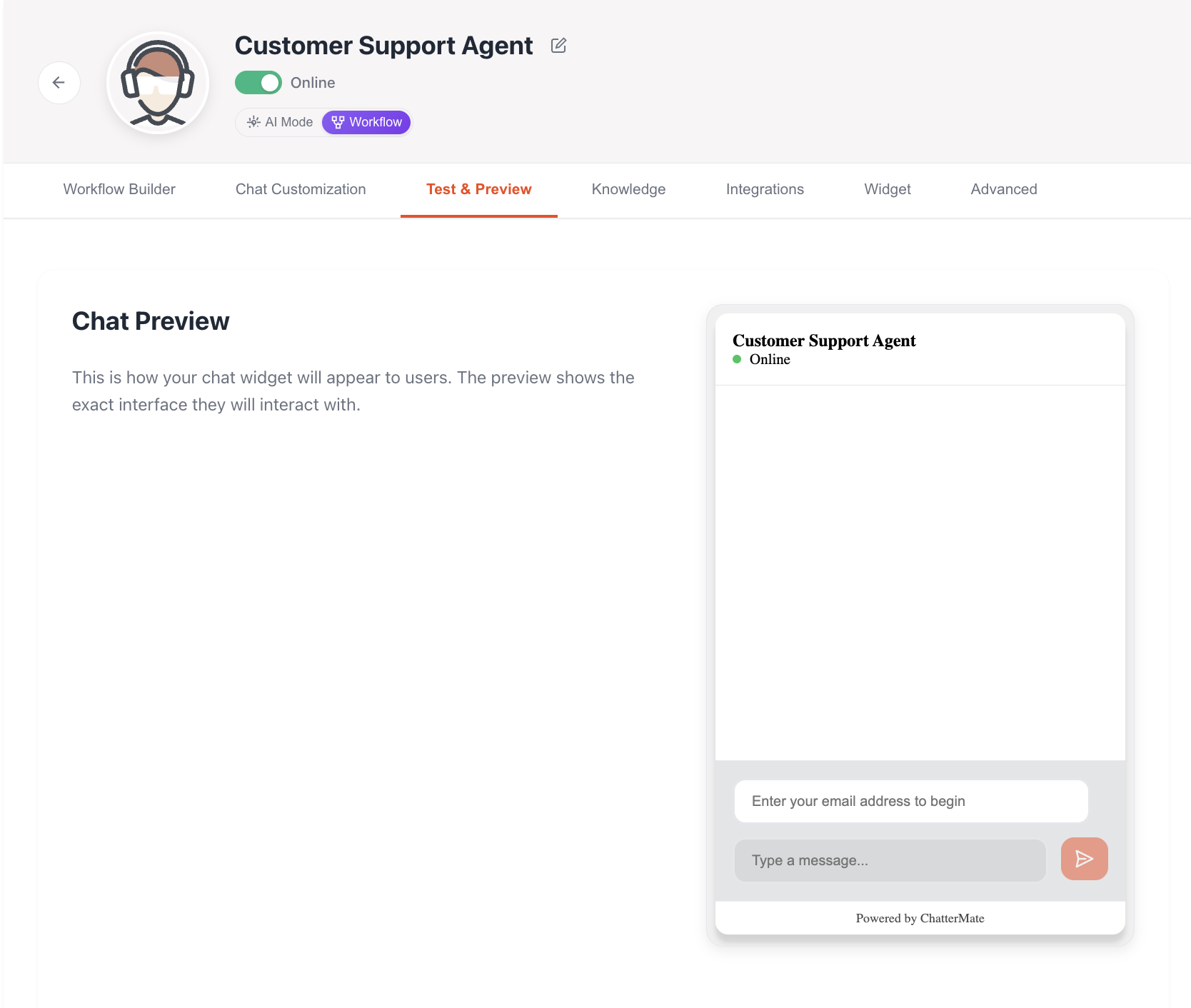 ## Customer Identification
### Email Collection
* Email is required before starting a chat
* Automatically identifies returning customers
* Loads previous conversation history
* Maintains context across sessions
## Testing Features
### Conversation Testing
* Test standard greetings and responses
* Verify tone and communication style
* Check response formatting
* Test multi-turn conversations
* Test queries against added knowledge
* Verify accurate information recall
* Check context maintenance
* Test complex multi-topic queries
* Test automatic transfer triggers
* Verify after-hours behavior
* Check transfer messages
* Test manual transfer requests
## Test Scenarios
### Customer Context
1. **New Customer**
* First-time interaction
* No previous history
* Basic profile creation
2. **Returning Customer**
* Previous history loaded
* Context from past interactions
* Personalized responses
### Common Test Cases
Test product knowledge and pricing responses
Verify troubleshooting capabilities
Test account-related responses
Multi-step problem resolution
## Chat History
### History Features
* Complete conversation logs
* Timestamp for each interaction
* Session summaries
* Action tracking (transfers, resolutions)
### History Usage
* Context for personalized responses
* Issue tracking and follow-up
* Training data for improvements
* Quality assurance reviews
Chat history is automatically associated with the customer's email address, allowing for seamless continuation of conversations across multiple sessions.
## Testing Best Practices
1. **Systematic Testing**
* Start with basic queries
* Progress to complex scenarios
* Test edge cases
* Verify error handling
2. **Knowledge Testing**
* Test recently added content
* Verify cross-document knowledge
* Check information accuracy
* Test knowledge updates
3. **Customer Experience**
* Verify response times
* Check message formatting
* Test file attachments
* Validate email notifications
## Test Environment
### Features Available
* Real-time chat interface
* Knowledge base access
* History simulation
* Transfer scenarios
### Testing Tools
* Chat widget preview
* Response analysis
* Performance metrics
* Error logging
Test thoroughly in the staging environment before deploying changes to production. This includes testing with different customer profiles and various conversation scenarios.
## What's Next?
After testing your AI agent:
1. Review test results
2. Make necessary adjustments
3. Update knowledge if needed
4. Deploy to production
Next: Learn how to integrate the chat widget into your website
## Customer Identification
### Email Collection
* Email is required before starting a chat
* Automatically identifies returning customers
* Loads previous conversation history
* Maintains context across sessions
## Testing Features
### Conversation Testing
* Test standard greetings and responses
* Verify tone and communication style
* Check response formatting
* Test multi-turn conversations
* Test queries against added knowledge
* Verify accurate information recall
* Check context maintenance
* Test complex multi-topic queries
* Test automatic transfer triggers
* Verify after-hours behavior
* Check transfer messages
* Test manual transfer requests
## Test Scenarios
### Customer Context
1. **New Customer**
* First-time interaction
* No previous history
* Basic profile creation
2. **Returning Customer**
* Previous history loaded
* Context from past interactions
* Personalized responses
### Common Test Cases
Test product knowledge and pricing responses
Verify troubleshooting capabilities
Test account-related responses
Multi-step problem resolution
## Chat History
### History Features
* Complete conversation logs
* Timestamp for each interaction
* Session summaries
* Action tracking (transfers, resolutions)
### History Usage
* Context for personalized responses
* Issue tracking and follow-up
* Training data for improvements
* Quality assurance reviews
Chat history is automatically associated with the customer's email address, allowing for seamless continuation of conversations across multiple sessions.
## Testing Best Practices
1. **Systematic Testing**
* Start with basic queries
* Progress to complex scenarios
* Test edge cases
* Verify error handling
2. **Knowledge Testing**
* Test recently added content
* Verify cross-document knowledge
* Check information accuracy
* Test knowledge updates
3. **Customer Experience**
* Verify response times
* Check message formatting
* Test file attachments
* Validate email notifications
## Test Environment
### Features Available
* Real-time chat interface
* Knowledge base access
* History simulation
* Transfer scenarios
### Testing Tools
* Chat widget preview
* Response analysis
* Performance metrics
* Error logging
Test thoroughly in the staging environment before deploying changes to production. This includes testing with different customer profiles and various conversation scenarios.
## What's Next?
After testing your AI agent:
1. Review test results
2. Make necessary adjustments
3. Update knowledge if needed
4. Deploy to production
Next: Learn how to integrate the chat widget into your website