

AI Provider Configuration
Configure your preferred AI provider to power ChatterMate’s intelligent customer support capabilities.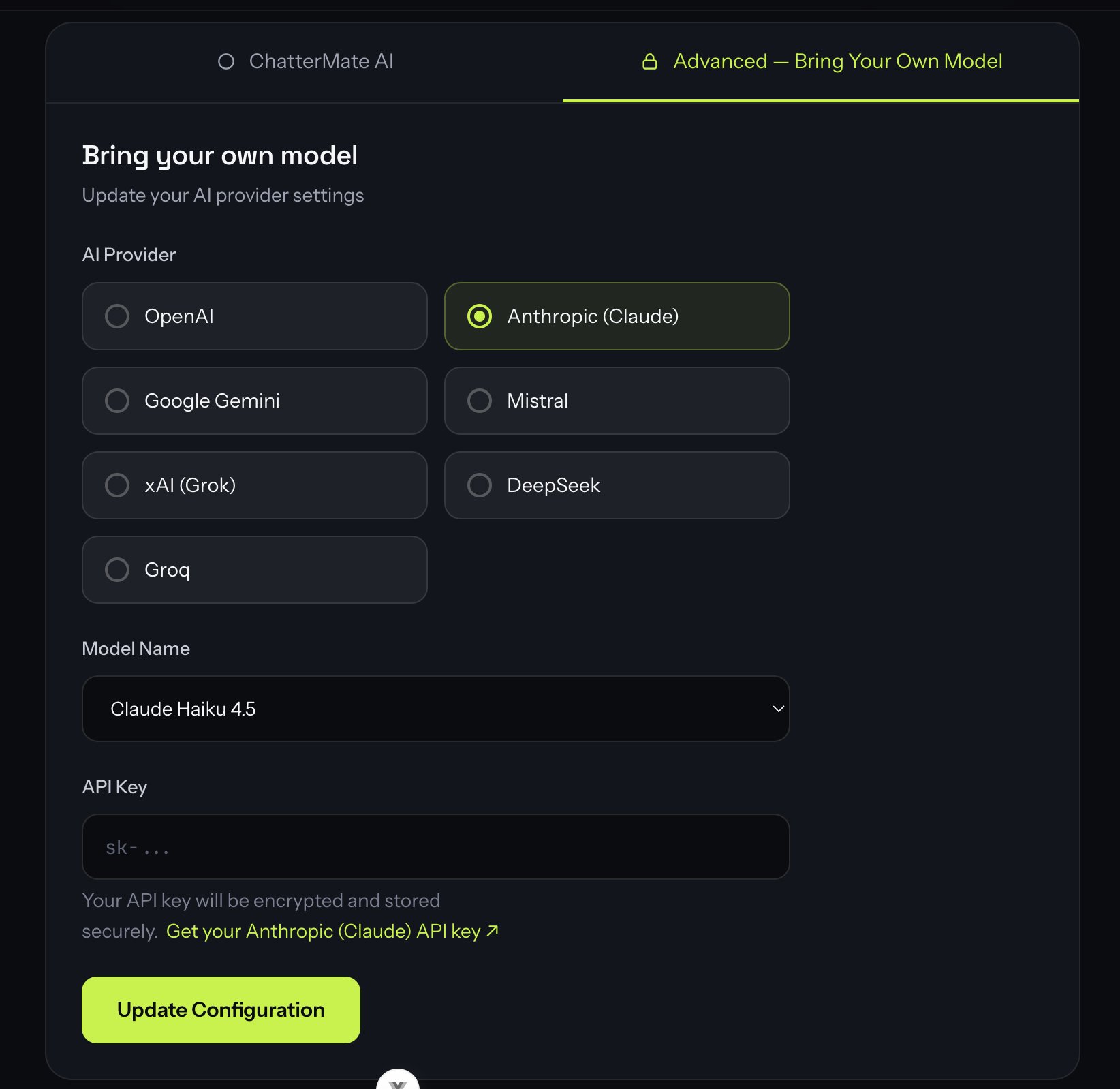
Available Providers
ChatterMate supports multiple AI providers, giving you the flexibility to choose the one that best fits your needs:OpenAI
GPT-4.1, GPT-4o, and o-series models
Anthropic (Claude)
Claude Opus, Sonnet, and Haiku
Google Gemini
Gemini 2.5 Pro / Flash
Mistral
Mistral Large, Medium, and Small
xAI (Grok)
Grok 4 and Grok 3
DeepSeek
DeepSeek Chat and Reasoner
Groq
Ultra-fast inference (GPT-OSS, Llama)
OpenAI-compatible
Self-hosted or gateway endpoints — Ollama, vLLM, llama.cpp, OpenRouter, LiteLLM
Want to keep inference on your own hardware? Pick OpenAI-compatible and give
ChatterMate the base URL of your own server. See
Self-hosted and gateway models for worked
Ollama, vLLM, llama.cpp, OpenRouter, and LiteLLM setups.
Configuration Fields
AI Provider
Select your provider from the grid. The seven hosted providers all support tool calling and structured output, so any of them works with ChatterMate’s agents, knowledge search, and workflows:- OpenAI (Recommended): Best-in-class models with consistent performance
- Anthropic (Claude): Strong reasoning and analysis
- Google Gemini: Large context windows, great price/performance
- Mistral / xAI (Grok) / DeepSeek / Groq: Cost and speed options
- OpenAI-compatible: Any endpoint that speaks the OpenAI chat-completions API — your own server (Ollama, vLLM, llama.cpp) or a gateway (OpenRouter, LiteLLM). This is the option to pick when the model should run on your own hardware.
Base URL
Only shown for the OpenAI-compatible provider — the other seven have no base URL field, because ChatterMate already knows where to reach them. Enter the root of your endpoint’s OpenAI-compatible API, including the version segment. ChatterMate appends the rest of the path itself:Trailing slashes and a trailing
/chat/completions are trimmed for you, so pasting
the full completions URL works too. The URL must be reachable from the ChatterMate
backend, not from your browser — see
Self-hosted and gateway models for the Docker
networking details.Model Name
Pick a suggested model from the dropdown, or choose “Custom model ID” to type any model your provider supports (handy when a provider ships a new model before this list updates).OpenAI-compatible has no suggested models. The model list belongs to your
endpoint, not to ChatterMate, so the dropdown offers only “Custom model ID…” —
select it and type the exact model ID your server reports.
ollama list, or
curl <base-url>/models -H "Authorization: Bearer <key>", tells you what to enter.Model IDs change over time as providers release and retire models. If a suggested ID stops working, use Custom model ID and paste the current identifier from your provider’s docs.
API Key
Your provider’s API key for authentication. Security measures:- Keys are encrypted before storage
- Keys are never logged or exposed in plaintext
- Access is restricted to authorized systems only
- Regular key rotation is supported
- Compliance with SOC 2 standards
Never share your API keys or commit them to version control. ChatterMate encrypts and stores them securely.
llama-server — enter
any non-empty placeholder (ollama is the conventional one). The value is sent as a
bearer token and ignored by a server that isn’t looking at it.
Saving the form runs a live test message against the provider with the key, model
ID, and base URL you entered. A save that fails with “Invalid API key” on an
OpenAI-compatible endpoint usually means the backend couldn’t reach the URL, or the
model ID doesn’t exist on that server — not that the key itself is wrong.
Best Practices
-
Provider Selection
- Start with OpenAI’s GPT-4.1 / GPT-4o for best overall performance
- Consider Anthropic’s Claude for complex reasoning tasks
- Use Groq (GPT-OSS / Llama) when you want the fastest, lowest-cost inference
- Use OpenAI-compatible when prompts and customer messages must not leave your infrastructure
-
Model Choice
- Balance between capability and cost
- Test different models before production
- Monitor usage and adjust as needed
- On a self-hosted model, verify tool calling works before going live — see Self-hosted and gateway models
-
Security
- Use environment-specific API keys
- Rotate keys periodically
- Monitor usage for anomalies
What’s Next?
After configuring your AI provider:- Test the configuration with sample queries
- Customize the AI agent’s behavior
- Add domain knowledge to improve responses
- Set up human handoff rules
Customize AI Agent
Next: Learn how to customize your AI agent’s behavior
Self-hosted and gateway models
Run the model on your own hardware with an OpenAI-compatible endpoint